I’m Niall Mackay, founder of Seven Million Bikes Podcasts and owner of Saigon Podcast Studio. I work with podcasters, business owners, and creators who want their show to look and sound professional without making the process too hard.
A multi-camera podcast setup is one of the best ways to make your video podcast look more polished. It helps your show feel more dynamic, keeps viewers watching for longer, and gives you more options when you edit. The good news is that you do not need a huge team or expensive gear to make it work.
In this guide, I’ll explain what a multi-camera podcast setup is, how many cameras you really need, the best camera angles, the key gear, and the mistakes to avoid.
What is a multi-camera podcast setup?
A multi-camera podcast setup means recording your podcast with more than one camera at the same time.
Instead of using one static shot for the whole episode, you capture different angles. This makes your podcast more engaging and gives the final video a more professional feel.
For example, a simple video podcast setup might include:
- one wide shot of both people
- one close-up of the host
- one close-up of the guest
This is popular for interview shows, business podcasts, and branded content because it helps the viewer stay focused on the conversation.
A podcast camera setup like this also makes editing easier. You can switch to the person speaking, cut out small mistakes, and create short clips for social media without the video feeling flat.
How many cameras do you really need?
This depends on your format, your budget, and where the podcast will be published.
If you are just starting, two cameras can work well. If you want a more polished result, three cameras are often the sweet spot.
Here is a simple guide:
- 1 camera: fine for solo podcasts or very basic video
- 2 cameras: great for a two-person interview
- 3 cameras: best for most professional podcast filming setups
- 4 or more cameras: useful for larger panels or high-end production
For most two-person shows, I recommend:
- one wide shot
- one close-up on the host
- one close-up on the guest
That setup gives you the cleanest result without making the recording process too complex.
If your goal is a professional podcast setup for YouTube, client content, or branded interviews, three cameras usually give you the best balance of quality and simplicity.
The best camera angles for a podcast
Good camera angles can make even a simple podcast studio camera setup look much better. Bad angles can make a great conversation feel awkward or dull.
The most useful angles are usually the simplest ones.
1. Wide shot
This shows both speakers in the frame. It is the anchor shot and helps give context to the whole conversation.
2. Host close-up
This camera focuses on the host. It is useful when the host is asking questions, reacting, or leading the conversation.
3. Guest close-up
This does the same for the guest. It helps the audience connect with their story and expressions.
4. Optional side angle
This is not always needed, but it can add variety if you want a more cinematic feel.
A good podcast video setup usually works best when the cameras are:
- at eye level
- framed consistently
- matched in color and brightness
- placed far enough away to avoid distortion
One of the biggest mistakes I see is adding extra cameras just because they look impressive. More cameras do not always mean a better result. Clear framing and a smart layout matter more.
Read More: What to Wear on Camera: 9 Tips to Look Good
What gear do you need for a multi-camera podcast setup?
A multi-camera podcast setup does not need to be overcomplicated, but you do need the right basics. It is always better to keep it simple and reliable.
Cameras for each angle
In a professional podcast camera setup, each camera should cover one angle clearly.
For a two-person podcast, that usually means:
- One wide camera for the full shot
- One camera on the host
- One camera on the guest
This is the most common multi-camera video podcast setup because it gives you clean edits and makes the conversation feel more natural on screen.
If you want your podcast filming setup to look polished, try to use cameras that match in image quality, color, and frame rate. Mixing very different cameras can make the final video look uneven.
Microphones and audio recording
Audio is still the most important part of any video podcast setup. A great-looking shot will not help if the sound is poor.
For professional recording, you will usually need:
- one microphone for each speaker
- mic stands or boom arms
- XLR cables
- headphones for monitoring
- an audio mixer or audio interface
- a recorder such as a PodTrak
If you are recording with multiple microphones, a PodTrak or similar recorder can make the workflow much easier. It helps you record separate tracks, monitor levels, and keep the sound clean and organised.
An audio mixer is also useful when you want more control over levels, gain, and the full signal flow during the session.
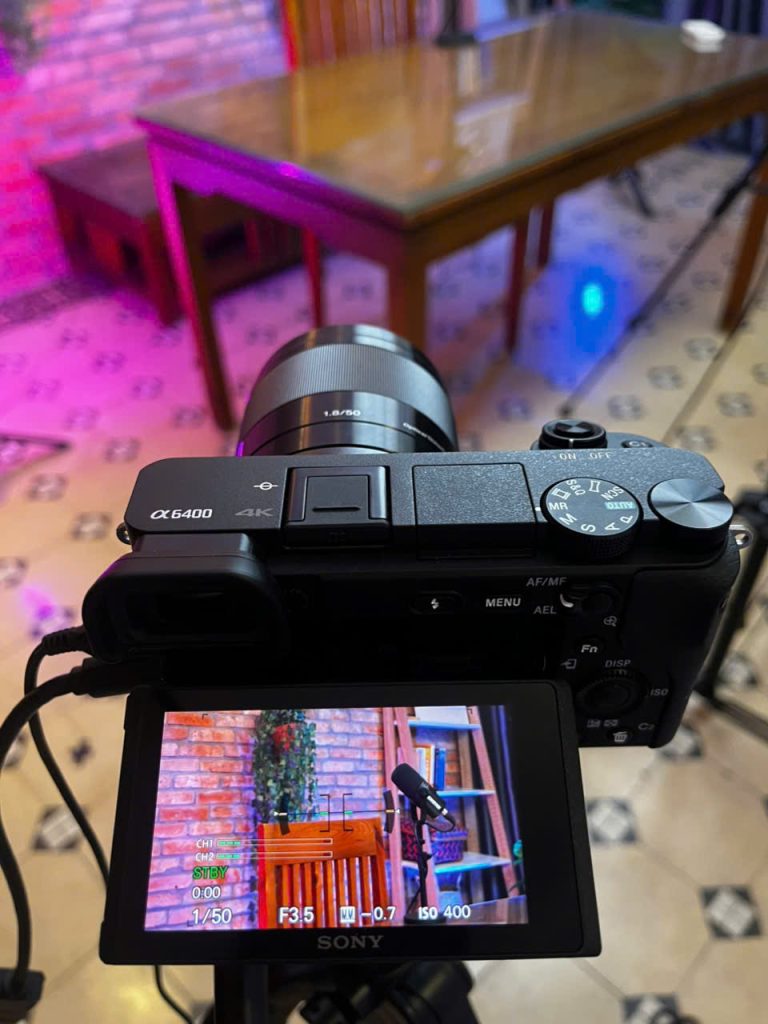
Monitor and camera control
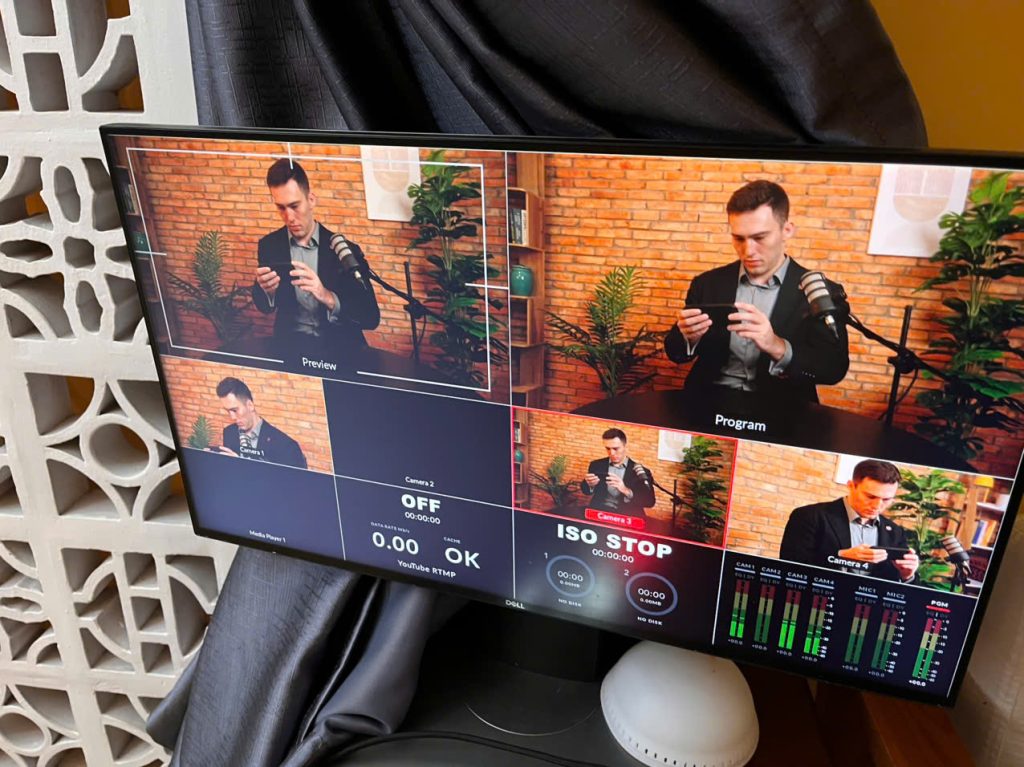
A monitor is very useful in a professional multi-camera podcast setup. It helps you check framing, focus, and exposure before and during the recording.
This can include:
- An external monitor
- The camera flip screen
- A larger production monitor, if you have one
Without a monitor, it is easy to miss small problems like soft focus, bad framing, or a guest leaning out of shot.
Cables and connection gear
Cables are not exciting, but they are a big part of a reliable setup. A professional podcast setup needs everything connected properly from the start.
You may need:
- XLR cables for microphones
- HDMI cables for cameras
- power cables and adapters
- memory cards or SSDs
- capture cards if recording into a computer
- extension leads and cable management
This is the part many people forget. A good podcast studio camera setup is not only about cameras and microphones. It is also about making sure every part connects smoothly.
Other useful gear
Depending on your workflow, you may also want:
- headphones for each speaker
- acoustic treatment in the room
- lighting for each person
- a switcher for live camera changes
- spare batteries or dummy batteries
- backup storage for recordings
These small details make a big difference, especially when you are recording long episodes or working with clients.
Recording and switching
You can record each camera separately and edit later, or use a video switcher to manage the feed live.
This depends on your workflow.
If you are creating long-form YouTube episodes and social clips, recording separate angles often gives you more flexibility. If you want faster delivery, a switcher can save time.
Common mistakes to avoid
A lot of people focus too much on cameras and forget the rest of the setup.
Here are the mistakes I see most often:
- Poor audio quality
- Weak lighting
- Bad framing
- Too many cameras in a small space
- Mismatched colors between cameras
- No test recording before the session
- Messy backgrounds that distract from the speakers
Another common mistake is making the setup too difficult to repeat. A professional podcast setup should not only look good. It should also be easy to run every time.
Before recording, always check:
- Audio levels
- Camera framing
- Lighting balance
- Memory cards and batteries
- Sync between sound and video
A simple, repeatable system will save you stress and give you a better result in the long run.
Conclusion
A multi-camera podcast setup can make your show look far more professional, but it does not need to be complex. For most podcasts, the best setup is simple: clean audio, good lighting, one wide shot, and one close-up for each speaker.
If you are building a podcast camera setup for business content, YouTube, or branded interviews, focus on clarity first. Start with the number of cameras you really need, use strong camera angles, and make sure your gear supports a smooth workflow.
That is what turns a basic video podcast setup into something people enjoy watching.
Need help filming your podcast?
A multi-camera podcast setup can really elevate your video content, but it also takes a lot of equipment, and the setup can get complicated fast. You need multiple camera angles, microphones, headphones, lighting, and everything connected properly so it all works together.
We work with creators, businesses, and brands that want:
- professional video and audio quality
- a simple recording experience
- content that works for YouTube and social media
At Saigon Podcast Studio, we make that easy. We offer:
- three camera angles at once,
- microphones, and headphones for up to 3 to 4 people.
- Everything is set up and ready before you arrive
You can focus on the conversation and start recording as soon as you walk into the studio.
So if you are planning your next video podcast and want it to look polished from day one, get in touch and let’s make it easy.